
An Expert Tool for Expert Users
2018–2019 · Enterprise SaaS · Diagnostic Systems · Oracle
Unifying Five Legacy Diagnostic Tools into a Single Workbench
Oracle's most experienced support engineers were diagnosing critical customer issues using five different homegrown tools that didn't talk to each other. Leadership wanted them consolidated. My job was to figure out how to do that without breaking the workflows that actually worked, or condescending to the people who'd built expertise over decades.
↪ Impact
✓ Replaced five fragmented diagnostic tools with one unified platform, retiring the legacy apps within a year with no loss of capability
✓ Resolution time for related service requests decreased 8% within the first year
✓ Automated diagnosis accuracy increased 22% as structured data replaced throwaway notes
✓ Contributed production patterns back to the Redwood Design System during its earliest adoption phase
✓ 13 individual interviews, 7 remote ethnographic sessions, and weekly design walkthroughs with users who became co-designers
↪ The Problem
Fragmented tools = fragmented process.
Oracle’s most experienced support engineers were diagnosing critical customer issues using a patchwork of homegrown tools, each built by different teams, with overlapping capabilities and no shared workflow.
These engineers had decades of domain expertise, but their tools forced constant context-switching, duplicated effort, and inconsistent analysis. More than half the 200+ reports generated weekly were never even viewed by the engineers who requested them.
Worse, the data these tools produced was essentially throwaway: unstructured, unlinked to causes or solutions, and useless for machine learning or knowledge retention.
Leadership wanted consolidation, with one tool to replace them all. But the challenge wasn't just combining five UIs into one. It was designing a single system that could serve engineers across eight support organizations, each with different products, different file types, and strong opinions about how diagnostic work should flow.
Five tools. Different mental models. No shared data. Engineers context-switched constantly.↪ My Approach
♠︎ Immersed
I conducted 13 individual interviews and 7 remote ethnographic sessions with senior engineers across Database, Middleware, EBS, Fusion, and Linux. These weren't casual conversations. I watched them work real customer issues: navigating between tools, marking up log files, copying and pasting diagnostic findings into service requests by hand.
I had to understand the workflow and the formal diagnostic methodology (Oracle Diagnostic Methodology: Triage → Diagnose → Solve) that governed every step of it.
♣︎ Mapped
I ran a detailed gap analysis against every legacy tool, working with SMEs to separate capabilities that were genuinely essential from those engineers had simply grown accustomed to. One tool was excellent at file navigation but terrible at documentation, while another had powerful search but couldn't display results in context.
The gaps were missing connections between features that should have been part of the same workflow.
♦︎ Unified
Designed a workbench organized around how expert diagnosis actually unfolds: as an investigation where engineers follow clues, not steps. The workbench metaphor was derived directly from the research: the engineers needed raw materials (files), tools for analyzing them (search, highlighting, annotations), a workspace for assembling findings, and a way to document and communicate results without prescribing a particular order.
♥︎ Delivered
I transitioned design to the shipping team with enough specificity that the intent survived handoff through 18 iterations of increasing fidelity. The product reached production, the legacy apps were retired within a year, and patterns I developed made it back into the Redwood Design System.
Mapping every capability across five tools to find what to keep, what to kill, and what was missing.↪ The Research
The stated requirement was "consolidate five tools into one." The real problem was that diagnostic evidence was invisible.
Every tool could find facts buried in log files. But those facts were trapped inside individual file viewers, inside unstructured SR notes, inside engineers' heads. No tool treated a diagnostic fact as a first-class object that could be tagged, scored for relevance, linked to causes, and reused across service requests. Engineers were solving the same problems repeatedly because the system had no memory.
The senior engineers I worked with, people with 20 to 30 years of domain expertise, articulated this clearly. They didn't want simpler tools. They wanted smarter data. One of the most experienced engineers described what he called the "Problem Object": a structured representation of everything known about an issue that would evolve through the life of a service request and persist after resolution for knowledge retention and machine learning.
That reframe changed the project. The consolidation was still necessary, but the design goal shifted from "replace five tools with one" to "build a workbench that produces structured, reusable diagnostic intelligence." Every design decision that followed, especially facts as objects, relevance scoring, and the workbench metaphor itself, came from that insight.
↪ The Design
1. Facts as objects
The most consequential design decision was treating each piece of diagnostic evidence as a rich, reusable object rather than a line of text.
In the legacy tools, engineers marked files as "Relevant" or "Not Relevant" in contrast to a binary flag that told you nothing about why. I replaced this with structured fact objects: each one had a name, a type (symptom, error, action), a category, a relevance score, a source link back to the file and line number, and space for the engineer's reasoning. Facts could be created automatically by diagnostic scanners or manually by highlighting text in the file viewer.
This served both the user and the business. Engineers could drag facts into their SR updates, building a documented chain of evidence. And because the data was structured, it could finally be consumed by prognostic engines to improve future automated diagnoses. The 22% accuracy increase came directly from this.
Early design showing diagnostic facts as structured objects and not just text notes, but reusable, scorable, linkable pieces of evidence.2. The workbench, not a wizard
Due to the investigative nature of the work, I designed a workbench rather than a workflow. The distinction mattered. A workflow prescribes steps. A workbench provides tools and lets the expert decide the order. Engineers needed to move freely between file uploads, fact analysis, SR updates, and knowledge search, and the UI had to support that without forcing a linear path.
The key architectural decision was a tabbed workspace (Workbench, Facts, File Upload, Update SR) with persistent context. The service request header, severity indicators, and customer information stayed visible regardless of where the engineer was working. This matched the way they actually thought: always aware of the customer situation while drilling into technical details.
A workbench, not a wizard. Engineers investigate. They don't fill in forms top to bottom.3. File viewer with in-context fact creation
Engineers spent most of their time reading log files, thousands of lines of dense technical output. I designed a file viewer that let them highlight text directly and convert it into a structured fact object without leaving the file. The fact inherited the file reference, line number, and timestamp automatically, so the chain of evidence was always intact.
This was where the "workbench" metaphor became most literal: select raw material, mark it, tag it, score it, and push it into the investigation, all in one motion.
Highlight text. Create a fact. Link it to the issue with a drag. One motion, no copy-paste, no context switching.4. Relevance scoring that replaced binary flags
The legacy tools used a simple Relevant/Not Relevant toggle. I replaced this with a three-state relevance system (Relevant, Not Relevant, Undetermined) with visual indicators that showed both the engineer's assessment and whether facts had been verified by a second engineer.
The system also tracked which facts were auto-generated versus manually created, giving visibility into how much of the diagnostic work was human versus machine.
Relevance scoring replaced binary flags, making diagnostic confidence visible and auditable.5. The Frankenstein pivot
After 18 iterations, I recognized I was building a Frankenstein monster. The users kept wanting more: more panels, more data, more tools visible simultaneously, and I'd been accommodating them. The result was a complex, dense interface that would have been accessible only to the power users who helped design it.
18 iterations of growing complexity, then a new design system gave me permission to simplify. +24% user satisfaction.
Then a new design system landed. Oracle introduced Redwood, its first modern design language, and my team was among the earliest adopters. Rather than treating this as a disruption, I used it as permission to step back and simplify. I stripped the interface down to focus on the single primary goal: producing the Problem Object. Unnecessary panels were removed. Keyboard navigation was given special attention. The result tested significantly better: +24% user satisfaction in guerrilla testing with 7 engineers.
↪ The People Who Made It Real
Early in the project, I sat with a Database support engineer, a man who had been at Oracle for nearly 30 years and had written some of the code he was now diagnosing. He walked me through a live service request, explaining each step of his investigation while I watched him navigate between three different tools, manually copying error codes from one window and pasting them into another.
At one point he paused on a log file, pointed to a highlighted line, and said: "I've seen this error six times this year. Each time I solved it the same way. But the system doesn't know that, because none of my previous work was structured in a way it could learn from. So every time, I start from zero."
That moment crystallized the entire design direction. The problem wasn't the tools. The problem was that decades of expert diagnostic knowledge were being produced and immediately discarded, locked in unstructured text that no machine could read and no colleague could reuse. DCAC had to be a tool that produced structured intelligence, not just helped someone navigate log files faster.
↪ The Outcome
Unified diagnostic tool = unified diagnostic process.
The engineers who had spent years navigating five different tools adopted a single platform that finally matched how they thought when diagnosing product issues. Patterns developed made it back into the Redwood Design System, which meant the work had downstream value beyond the immediate product.
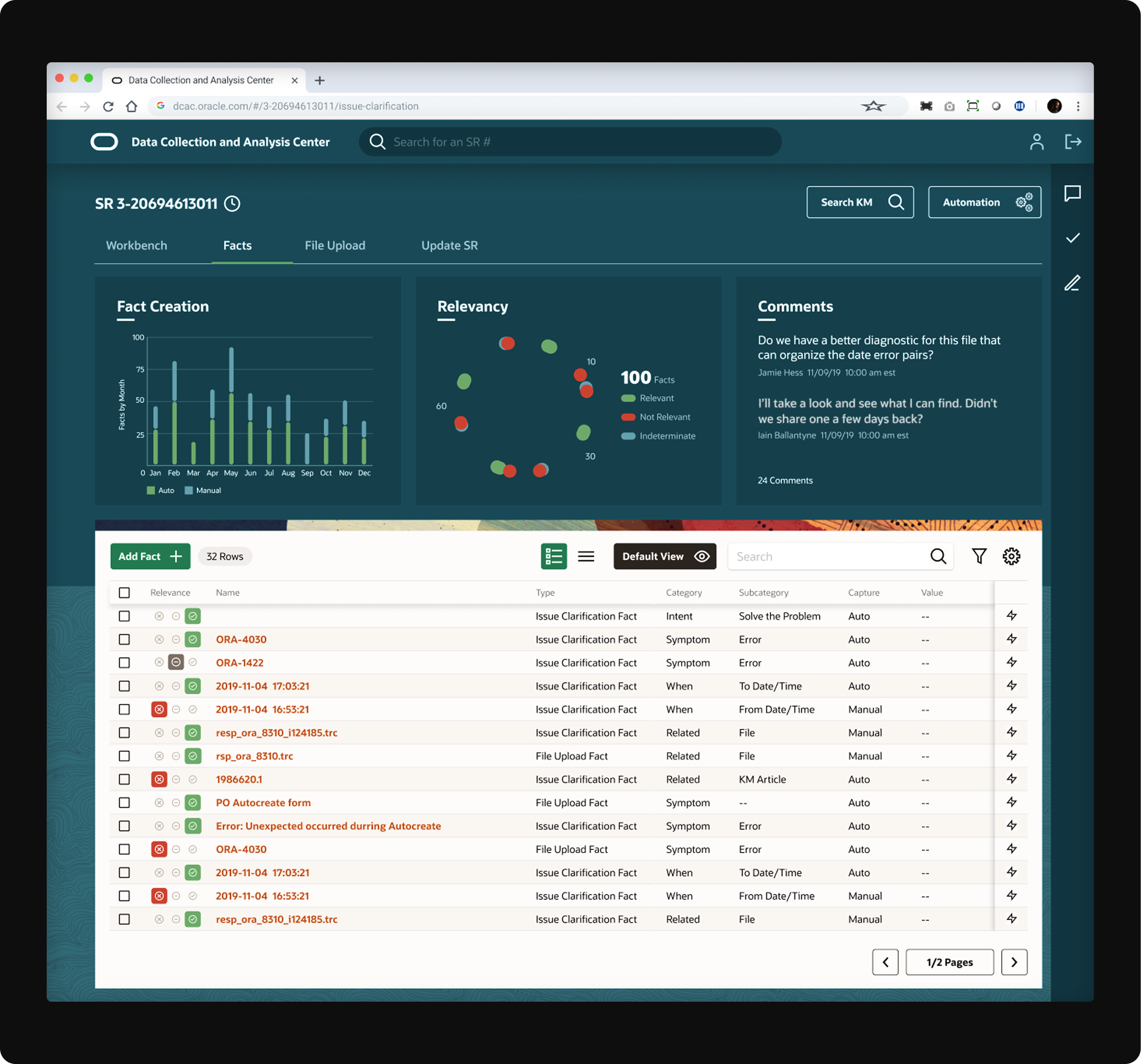
One unified platform supporting expert diagnosis across Oracle’s on-premise products.