
The Weight of a Number
2014 · Federal Judiciary · Criminal Sentencing · CSRA / U.S. Courts
Zero-Error Sentencing Calculator for Federal Officers
Tablet-optimized for probation officers defending calculations during sentencing hearingsRedesigning the federal sentencing calculator used across all 94 U.S. districts, where every calculation carries constitutional weight and failure means an unjust sentence.
↪ Impact
✓ Adopted across all 94 federal court districts by 30,000+ court staff
✓ Replaced an unreliable legacy calculator in zero-error courtroom environments
✓ Designed and coded the full front-end — UI, interaction logic, and responsive layout — using AngularJS
✓ Grounded in ethnographic research inside federal courthouses, including direct observation of sentencing hearings
↪ The Problem
The calculation that determines the sentence
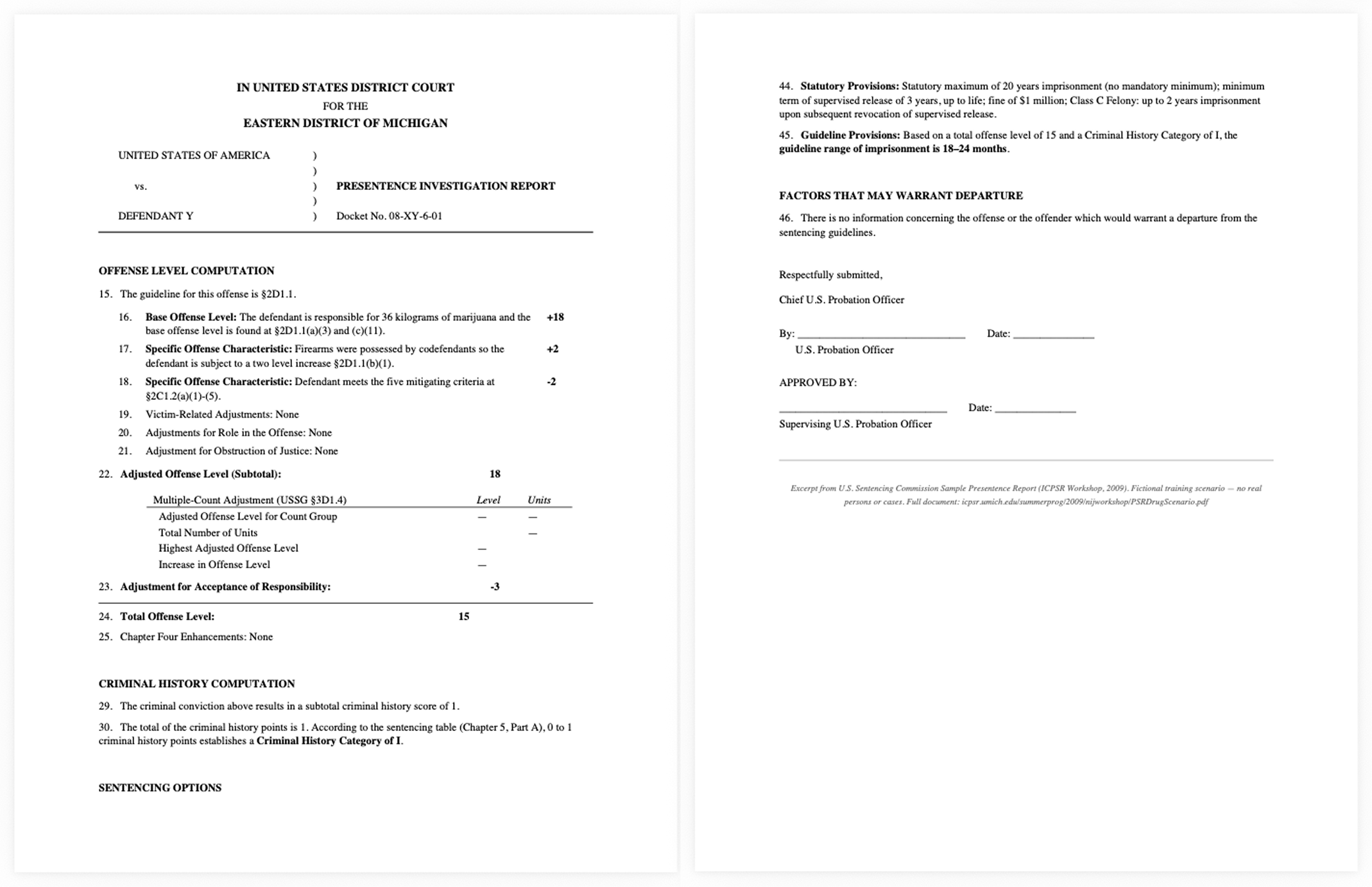
When someone is convicted of a federal crime, a U.S. Probation Officer calculates a recommended sentencing range using the Sentencing Commission's Guidelines Manual. The calculation walks through multiple chapters of guidelines — matching counts to offense categories, applying adjustments for specific facts, grouping multiple counts, scoring criminal history — to produce a number, in months, that becomes the centerpiece of every argument at the sentencing hearing.
The existing calculator was a legacy Java application approaching end-of-life. It produced unreliable results and couldn't run on the tablets court staff were increasingly using in the field.
The guideline calculation: branching, conditional, and high-consequence at every decision point↪ My Approach
♠︎ Immersed
Weeks studying the Guidelines Manual, interviewing pre-sentence officers, understanding the judgment calls embedded in every calculation. My clients wondered why I needed this depth. It turned out those questions uncovered assumptions no one had examined.
♣︎ Observed
Ethnographic research inside federal courthouses, watching sentencing hearings, seeing how calculations were referenced, challenged, and defended in real time.
♦︎ Designed & Built
Designed the complete interface and wrote the full front-end code: HTML, CSS, JavaScript, AngularJS, Foundation. Not a handoff. I designed in the browser and iterated in code.
♥︎ Shipped
The calculator was provided to all 94 federal districts, replacing the legacy tool as the standard for offense-level calculation.
↪ Research
The Reframe
The stated requirement was tablet optimization so judges could consult the calculator on the bench.
Courtroom observation revealed judges never touch calculation software. They have the PSR, the memoranda, and the Manual. A judge's role is to resolve disputes about a calculation, not perform one.
The real tablet user was the probation officer. They’re present at sentencing, regularly called on to explain and defend specific guideline determinations while being questioned live.
That reframe changed the design from a decision-making tool to a traceability tool.
↪ The Design
1. Node-based nav pattern
Parent-child cascade — selecting a Specific Offense Characteristic immediately recalculates the offense level, grouping, and sentencing range
Non-linear exploration — officers work through guidelines the way they think: branching, iterative, judgment-driven
Courtroom-ready traceability — navigate to any node, show the selection, show the cascade, show what changes if that selection changes
The sentencing guidelines are a tree, not a form. Officers don't fill in fields top-to-bottom — they explore scenarios, compare paths, and apply professional judgment at every branch. The interaction pattern had to match that mental model.
This pattern also served the courtroom directly. When counsel challenges a point adjustment, the officer can navigate to that node, show their reasoning, and demonstrate what an alternative would change, live, on a tablet, while being questioned.
Early interaction mockup establishing the node-based navigation pattern, real-time offense level computation, and hierarchical guideline structure. Built in-browser using AngularJS, before any visual styling was applied.2. Zero-error design in a zero-tolerance environment
No smart defaults. Every value has to be explicitly selected. Nothing gets silently assumed.
Manual-matched terminology. Labels use the exact language of the Guidelines Manual. Any discrepancy would undermine officer confidence.
Clear editing state. Visual hierarchy separates what you're changing from what you're reviewing.
3. The tool's invisible authority
The calculator has no legal standing. The Guidelines Manual is the actual authority. But probation officers trust the tool. Judges trust the PSR the tool produces. The software's interpretive choices ripple through the system without ever being formally examined: how it handles grouping, how it sequences adjustments, which options it decides to surface.
Every default is a policy decision. Every interaction pattern is a frame around someone's judgment. I designed for transparency at every level, because the downstream decision-maker would never see the tool. They'd only see the number it produced.
Labels match the Guidelines Manual verbatim. Every value has to be explicitly selected. No smart defaults, no auto-complete. In a zero-tolerance courtroom environment, the interface earns trust by matching the source of truth exactly.4. I coded this
I wrote the full front-end. Learned AngularJS alongside the development team and built the prototype that became the production application. When a parent-child checkbox created an ambiguous state, I saw it immediately and fixed it in minutes. When a guideline section expanded and pushed the running total off-screen on a tablet, which is exactly the moment an officer in a courtroom would lose trust in the tool, I caught it because I was the one holding the tablet.
The cascade logic I wrote. Every selection change triggers a full recomputation, from base offense level through the sentencing table range. That's what makes the hierarchical navigation actually work.
The Moment It Became Real
Midway through the project, I sat in the gallery of the Daniel Patrick Moynihan Federal District Courthouse for the Southern District of New York while a college roommate was sentenced. The attorneys argued about specific offense characteristics, the same Chapter Two selections I'd been building interaction patterns for at my desk. The PSR was central to every argument. The offense level calculation I was designing was the calculation that had just determined how long my friend was going to prison.
That's when it hit me: this wasn't really an application I was building. It was infrastructure. People trusted it without ever looking closely at it, and it carried real weight without anyone ever citing it by name. Somewhere past the pixels and the flows I'd been sketching, an actual person's life was changing.
It didn't change a single thing about the design. It did change, permanently, how I understood the weight of the work.
↪ The Outcome
The courtroom is where it matters most
The calculator was adopted as the standard sentencing calculation tool across all 94 federal court districts, used by approximately 30,000 court staff including pre-sentence officers, judges, and attorneys. It replaced the legacy Java-based tool with a modern, tablet-ready, responsive application built on AngularJS. It matched how experienced officers actually think through a case, branching and judgment-driven, instead of forcing that work into a rigid linear form.
If I were doing this today, I'd push harder for direct observation earlier in the process. The courtroom visit happened by coincidence, not because I'd planned it that way, and it deepened my understanding of how the tool got used under pressure more than anything else in the project did. If I'd built that kind of field observation into the research plan from day one instead of leaning on office-based interviews, I probably would have gotten to the real insights faster.
Where the calculation ends. Offense Level 15 meets Criminal History Category I on the Sentencing Table. The gold cell reads 18–24 months, the number the entire tool exists to get right.↪ The Takeaway
The tools we build carry the weight of the decisions they inform. A sentencing calculator only looks like a form with inputs and outputs. Underneath, it's an instrument of consequence. Designing for that means respecting the expertise of the people using it, the gravity of what they're calculating, and the fact that somewhere downstream of every pixel, a real human life changes.
Researched, Designed, Coded, Shipped